Prepare a WordPress draft with n8n and keep publishing under control

A real n8n and WordPress test: validate an assignment, create or update a draft by ID, and verify that publishing requires a separate step.

If the goal is to save time moving copy into the editor, automate draft preparation. Publishing has a different owner and a different requirement: someone must be able to open the exact version, read it, and decide whether it should go live.

On November 6, 2026, we tested this flow with n8n 2.44.7, its WordPress node v1, and WordPress 7.1.4 on an isolated Docker network. The content was synthetic, and the installation exposed no host ports. The test did not use Content Hub as its automation engine or test WPML.

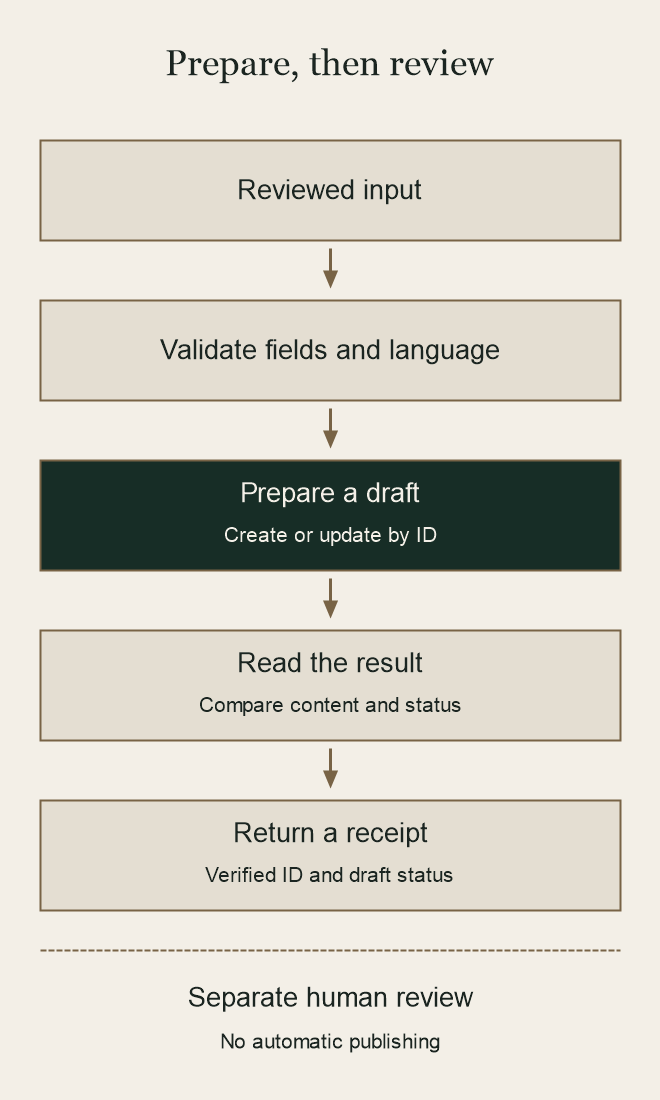
Draft preparation flow: validate input, create or update a draft, read it back, and return a receipt; publishing remains a separate human decision.
The workflow ends after verifying the draft. Publishing remains a separate decision.

Table of Contents

Define input you can validate

The flow receives a stable editorial reference, title, body, language, and requested status. If a known draft already exists, it also receives its ID. This was the first test input, in the test site’s language. It contains no credentials or client information:

{
  "editorial_ref": "CN26-063-DEMO-20261106",
  "title": "Prueba editorial CN26-063: borrador sin publicar",
  "content": "<p>Contenido sintético para comprobar la preparación de un borrador. No publicar.</p>",
  "language": "es-ES",
  "status": "draft",
  "wp_post_id": null
}

Before contacting WordPress, we checked that the required text fields were present, the body contained usable text, and the reference matched the agreed format. The accepted status was draft. An ID, when present, had to be a positive integer. The write node also sends draft as a fixed value instead of taking an arbitrary status from the copy or another automation.

Language has a separate boundary. The test site used one language, and the flow accepted es-ES. We did not pass language as though it were a translation field in the WordPress Posts API. For a bilingual site, verify how the language and translation relationship are assigned before extending this flow.

Create or update based on the target ID

The n8n WordPress node can create, retrieve, and update posts. To create the draft, we used the validated title and body, a slug derived from the reference, and the fixed status. To update it, we first read the specified ID. The flow continued only if the result had that ID, was still a draft, and had the slug matching the test reference.

The ID identifies the object you can review; the reference connects it to the editorial assignment. Store them together. A slug derived from the reference does not make creation idempotent. If a connection drops before you know whether the write succeeded, locate the draft before repeating the create step.

Read the result before counting the work as done

After writing, we made a second authenticated read by ID in the edit context. We compared the title, body, slug, and status. This distinguishes “the request returned” from “the version we intended to prepare is stored as a draft.” Here is an excerpt from the observed receipt:

{
  "editorial_ref": "CN26-063-DEMO-20261106",
  "wp_post_id": 6,
  "wordpress_status": "draft",
  "verified_by_readback": true,
  "language_requested": "es-ES",
  "publication_authorized": false
}

After changing the title and body, the second run kept ID 6 and draft status. Test inputs with a missing title, publish, or an unsupported language were rejected without increasing the contributor account’s post count.

Keep publishing outside the flow

The test used a contributor account. With the same credential, a direct request to publish returned 403 with rest_cannot_publish. An unauthenticated read of the draft returned 401. The lab contained no published posts. These observations apply to that configuration; they do not establish permissions on another installation.

For a remote connection, use HTTPS and store an application password in n8n’s credentials, outside the assignment body and receipt. The reviewer needs to open the draft by ID and check the content, links, and version. If you automate a later stage, it should start with explicit approval of that version.

Start with one synthetic post in a test site. If you can create, retrieve, and update it without changing its ID or status, you have a basis for removing copy-and-paste work while keeping editorial control.

Leave a Comment

Your email address will not be published. Required fields are marked *

Scroll to Top